
How to Deposit Money to the 356PK Game?
356PK Game has a built-in wallet system. Once you add funds, you can play games, join promotions, and use the rest of the app’s features. The deposit process can feel confusing to new users, but the steps are straightforward. Familiar local options like Easypaisa and JazzCash make adding funds comfortable, and knowing the process in advance saves you time and helps you avoid mistakes.
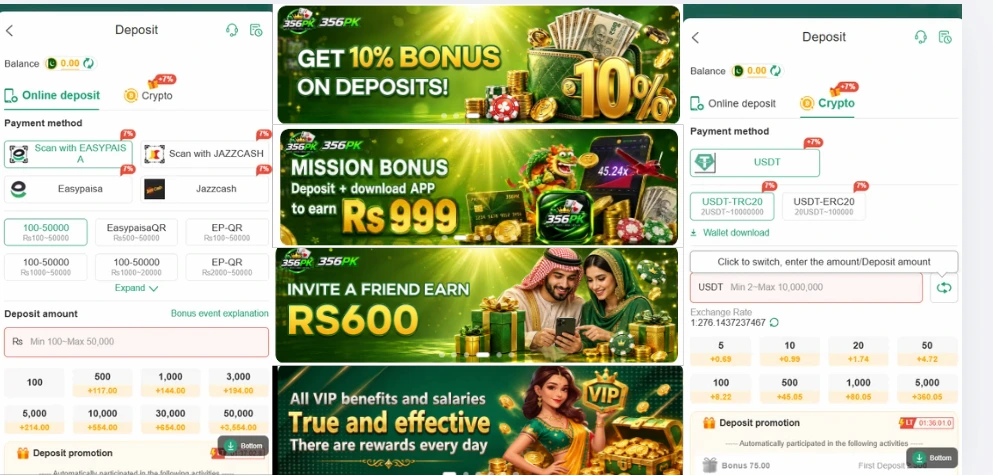
What Does the Deposit Feature Do?
The deposit feature tops up your 356PK wallet balance. You can spend that balance on games, special offers, and other parts of the app. The process is quick, and any user can complete it without trouble.
What You Need Before You Start
- An active 356PK Game account
- A stable internet connection
- A registered and active mobile number
- A supported payment method
- Enough balance in your payment account
- The latest version of the 356PK app
Step-by-Step Deposit Guide
Step 1: Open the app. Launch 356PK on your phone and log in with your registered details.
Step 2: Go to your wallet. Find the Wallet button on the home screen and tap it. You will see Deposit, Withdraw, and your available balance.
Step 3: Tap Deposit. The deposit form will open.
Step 4: Choose a payment method. Select Easypaisa or JazzCash, whichever you use. Both are well-known and trusted.
Step 5: Enter the amount. Type the amount you want to add, keeping it within the minimum and maximum deposit limits.
Step 6: Enter your account number. Type the number of the account you are paying from. Make sure it is correct, or the transaction may fail.
Step 7: Review and submit. Check the amount and number once more. If everything is right, tap Submit or Deposit.
Step 8: Approve the request. A payment request will be sent to your Easypaisa or JazzCash account. Open that app and approve it.
Step 9: Check your balance. Go back to 356PK and look at your wallet. Once the transaction completes, the amount will appear and you can start playing.
Supported Payment Methods
Tips for Safe Deposits
- Only deposit through the official 356PK app.
- Re-check all payment details before sending money.
- Always use your own payment account.
- Keep a screenshot of the transaction until the deposit is complete.
- Never share your payment account PIN with anyone.
- Avoid unofficial agents who offer to handle deposits for you.
- Don’t use public or shared Wi-Fi while depositing.
Common Problems and Quick Fixes
| Problem | Solution |
|---|---|
| Payment is pending | Wait a few minutes, as some payments take time to process. |
| Invalid payment details | Re-enter the account number and amount correctly. |
| Internet connection issue | Switch to a stronger network. |
| Payment rejected | Make sure your payment account has enough balance. |
| Wallet balance not updated | Wait a few minutes, then refresh the app. |
Why Keep Your Wallet Funded?
- Games run without delays.
- You can take part in special offers.
- Managing your balance becomes easier.
- You get access to exclusive features.
Mistakes to Avoid
- Sending money to the wrong account
- Typing the wrong amount
- Closing the app during the deposit
- Skipping payment verification
- Not updating the 356PK app
- Sharing your account credentials
Conclusion
Depositing in 356PK Game is simple if you follow the steps in order: log in, open the wallet, choose a payment method, enter the amount, and confirm. Always review your details before approving a payment. Using safe payment methods, keeping your transaction records, and following the security tips above will help you avoid small problems and keep your wallet running smoothly.